
Share Your Discoveries on an Online Family Tree
The stories, photos and charts you gather for your book can also live on your online family tree, attached to the people they belong to. Cousins you've never met can find them there, and they stay with the family tree for generations to come.
FanChartBook gets each item ready for your online family tree. It prepares the file, a title, a description, a source citation and any AI-disclosure line the item needs, then walks you through a review. You add the finished item to the person's page on your tree. You decide what is shared and who it belongs to, every time.

What you can contribute
An online family tree holds four kinds of items. FanChartBook suggests the right one for whatever you're preparing:
- Story: written text, such as an interview, a life sketch or a transcript.
- Photo: a picture, including photos you've restored, repaired or colorized.
- Document: a file kept with a person, such as a fan chart, a map or a scanned record.
- Audio: a recording, such as an interview with a grandparent.
You can also prepare a Source, a citation that supports a fact about a person or a relationship. Sources are for evidence rather than keepsakes, and FanChartBook offers that option for research results and record transcriptions.
Keepsakes and heirlooms are prepared as a single Memory attached to the person, with the keepsake's first photo. You see a preview and confirm it, the same as everything else.
Where it's available
FanChartBook Core prepares your main fan chart and your finished book files.
FanChartBook Deluxe adds online family tree preparation to nearly every enhancement tool: interview pages, restored photos, maps, charts, keepsakes, research discoveries, transcribed documents and more.
How it works
1. Choose what to share
When you've saved something you want to contribute, select the Prepare button. A short form opens with the details already filled in from your project:
- the contribution type (Story, Photo, Document, Audio or Source)
- the online tree ID of each person it belongs to
- a title and description
- a citation, evidence link or notes
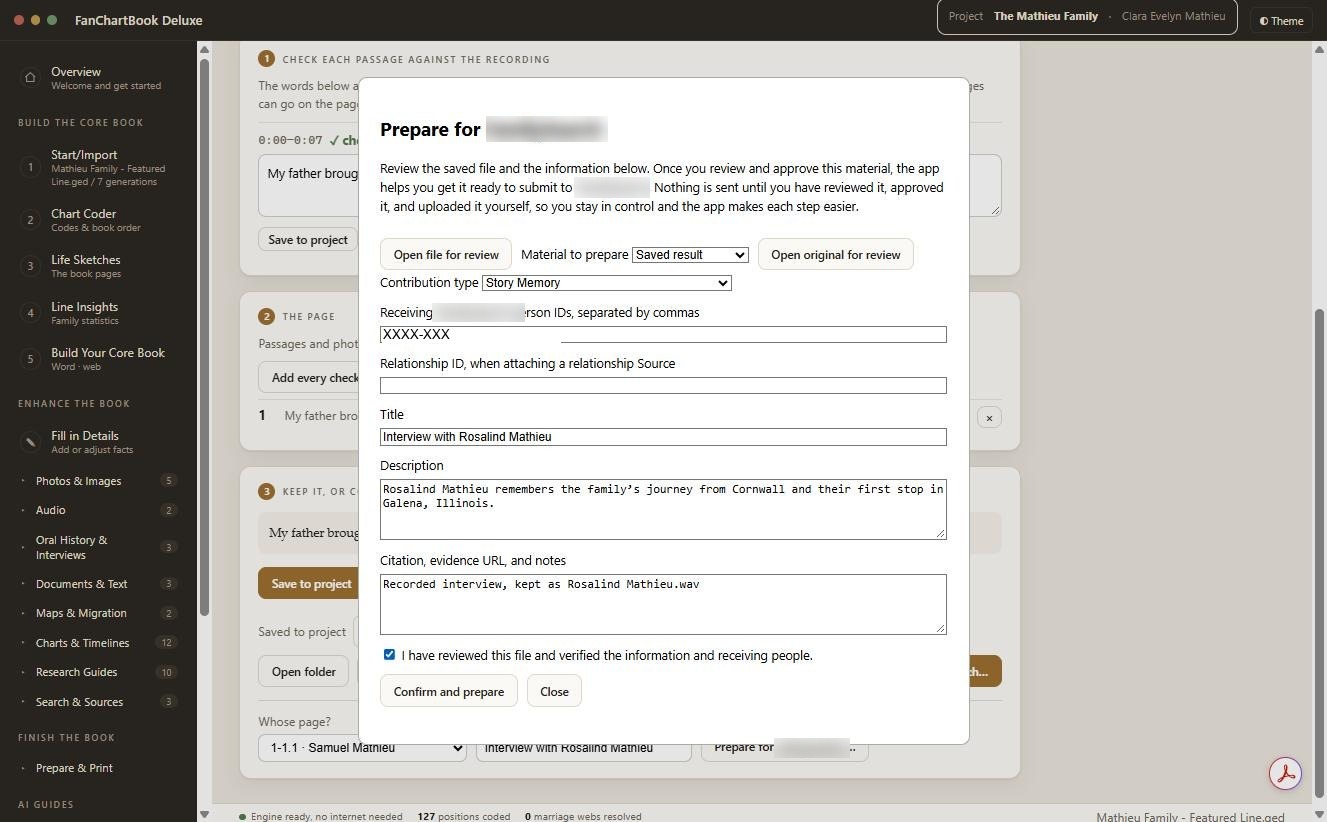
Tip: a person's ID appears under their name on their page in your online tree. It looks like KWXX-XXX. One item belongs to as many people as you list. Separate the IDs with commas.
2. Review and approve
Open the file and read it through. Check the title, description and the people it's going to. Select Review the Memory text to see exactly what will be prepared, including any AI-disclosure line. When it's right, tick "I have reviewed this file and verified the information and receiving people" and select Confirm and prepare. The first time, FanChartBook asks for the name to credit as reviewer, because every contribution records who reviewed it.
FanChartBook confirms that the item is prepared and that nothing has been sent.
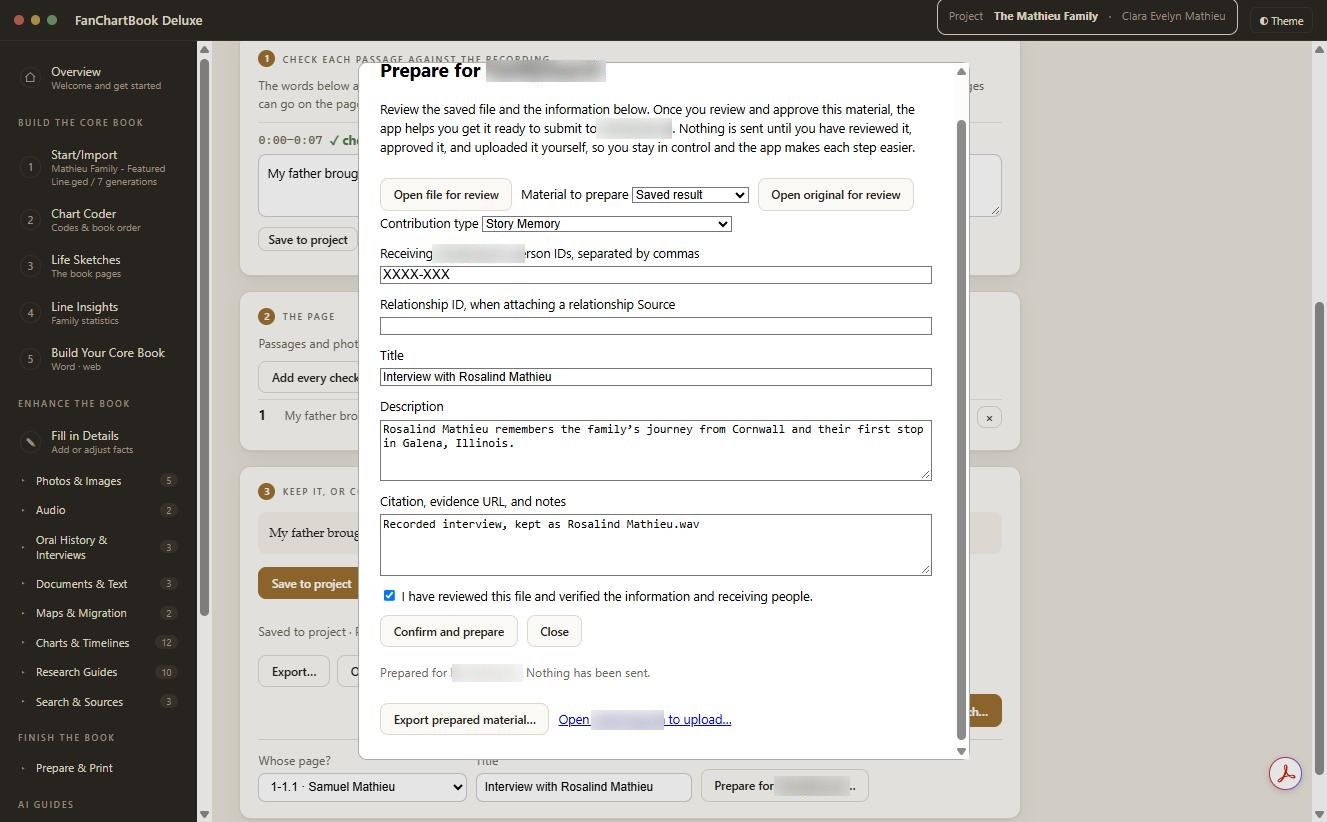
3. Add it to your online tree
Select the Open button. Your online tree opens in your web browser. Sign in, go to the person's page and add the file, using the title and description you approved. Your tree's own help pages explain each step of adding a file.
Prefer to upload later, or to give the item to a relative? Select Export prepared material. FanChartBook saves a single ZIP file wherever you choose. It holds the item, its original (such as the scanned page), any transcripts, and a plain-text details file with the person IDs, title, description and citation ready to copy and paste. You add the item itself on your online tree's site.
You stay in charge
You choose what to share on your online family tree and which person to attach it to. FanChartBook prepares the files, and you review and add them yourself.
That also makes the sharing decisions yours. Before you share photos or recordings of living relatives, ask them first. Some may prefer to stay private.
Before you share: a short checklist
- Is every name, date and place correct?
- Is it attached to the right person, and every person it belongs to?
- Does the description tell a future reader who, what, when and where?
- Is the source cited, so others can check it?
- Did anyone living in the photo or recording agree to share it?
Product and company names mentioned here belong to their owners. Peepsock Press, LLC is not affiliated with or endorsed by them.